Corporate Design All the Way into Apple Wallet: Your Digital Identity Consistent on Every Smartphone
How to bring your digital business card in your corporate design into Apple and Google Wallet. Brand consistency, offline access and one swipe to your card.
Опубликовано 7 мая 2026 г. · 4 мин. чтения
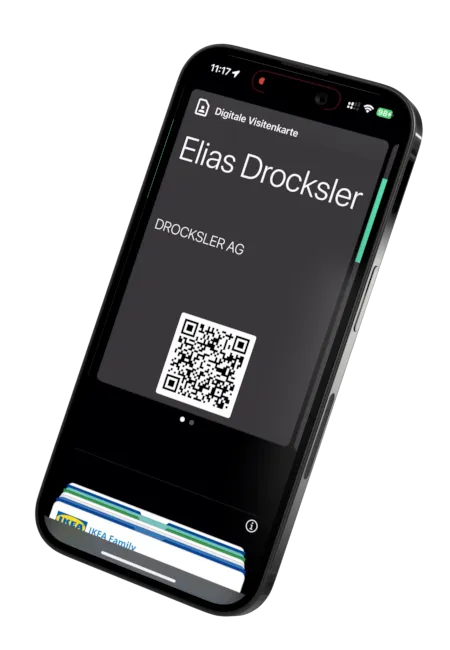
Even the best digital business card is of little use if your contact never finds it again after the first exchange. A link in the browser history disappears, a PDF in the downloads folder is forgotten. The decisive question is therefore not just how you share your card, but where it ends up afterward, and how naturally it is anchored in the everyday flow on the other person’s smartphone.
The answer is closer than you think: in Apple Wallet and Google Wallet. Right where your contact already reaches for their credit card, their train ticket and their boarding pass every day. Your card no longer needs to be hunted down in the browser, it sits ready to use in the wallet, available with a single swipe.
The Smartphone as a Digital Wallet: Where Your Customers Already Are
The wallet has evolved from a pure payment tool into the central place for everything that matters and needs to be at hand quickly. Tickets, boarding passes, loyalty cards, membership IDs. It is one of the most frequently opened places on any smartphone.
That is exactly why it is the ideal spot for your business card. Instead of hoping your contact rediscovers a link, you place your identity right where they spend time every day anyway. You do not have to fight for attention, you secure a permanent place in the digital wallet.
Why the Wallet Card Is the Logical Evolution of the Business Card
The paper card ended up in the drawer. The pure browser card vanished into the history. The wallet card, on the other hand, stays visible, permanent and within reach. It combines the advantages of both worlds: the durability of a physical card and the currency of a digital solution.
When your phone number or role changes, the card in the wallet updates automatically. Your contact does not have to save anything new, and you do not have to send anything new. The card always stays current without anyone having to take action. That is the decisive difference from any static format.
Step by Step: How to Bring Your Brand into Apple and Google Wallet
For the wallet card to be not only functional but a genuine brand experience, branding is what matters. Here is how you go about it:
- Choose a wallet template: You start with a template that makes the most of the wallet format.
- Set your colors: Apply your corporate design colors to the background and text so the card is immediately recognizable as yours.
- Add your logo: Place your logo prominently, just like on a premium membership card.
- Keep the structure clear: Reduce to the essentials, name, role, the most important ways to reach you. A clear structure feels more valuable than an overloaded layout.
The result is a card that looks like an exclusive membership card in your contact’s wallet, in your look, with your logo, in your colors. It is exactly this sense of quality that stays in memory.
The Benefits: Offline Availability and Lightning-Fast Access in Daily Life
An often underrated plus: the wallet card works offline too. In a dead zone, on a plane or in an underground garage, your contact can reach your details at any time, with no internet connection at all. A pure browser card fails in these moments.
On top of that comes speed. Instead of opening an app, searching and scrolling, one swipe to the wallet is enough. These few seconds often decide, in a hectic everyday routine, whether your card gets used at all. Smoothness here is not a luxury, but the factor that decides visibility.
Conclusion: Modern Branding Knows No System Boundaries
A consistent brand identity does not end at the edge of your website or your app. It reaches all the way to where your customers actually are, and today that is the digital wallet on their smartphone. Whoever brings their brand into the wallet secures visibility, currency and a professional presence all in one.
We show you exactly how to set up your card on the page about the Apple and Google Wallet business card. For teams, it is worth a look at central templates for the team, so every wallet card appears uniformly in the corporate design.
Want to implement the wallet solution for your company? Feel free to describe your goal through the form below.