All of your team's leads in one place
Whether scanned via QR code, captured through lead generation or digitized with the business card scanner: leads land centrally in the team contact book, stay automatically up to date through connected cards, and, once the CRM connection is set up, move into your CRM automatically.
From first contact to closed deal
No retyping, no paper chaos, no more dead leads buried in the trade show bag.
Captured fast
Leads are created via QR scan, through lead generation or the business card scanner, which turns paper cards into a contact directly using AI analysis.
Central to the team
All contacts live in one shared team contact book. Anyone with the necessary permission can see and use them, complete with profile picture, company, title and note.
Always up to date
If a contact is linked to a oneVcard digital card, it is marked as automatically synced and pulls in name, company and contact details live.
Cleanly filtered
Filter the team contact book by the user who captured a lead and by creation date, for example all of a colleague's leads from the three trade show days.
Cleanly into the CRM
Once the CRM connection is set up, new leads arrive in your CRM automatically. Alternatively, export selected contacts as CSV or VCF so the follow-up continues where your sales team works.
Fully traceable
Every contact carries Created on and Created by, meaning the date and the email of the colleague who added it. Lead attribution without any argument.
Scan a card, the contact is there
Point the camera at a business card, whether paper or digital. oneVcard reads the name, company, role, phone and email and turns it into a clean contact in seconds. No retyping, no half-finished records: the new lead lands straight in your shared team contact book, ready for everyone with access.
Every team contact in one place
Collected leads and contacts land in a single spot, searchable, filterable and ready to export to your CRM.
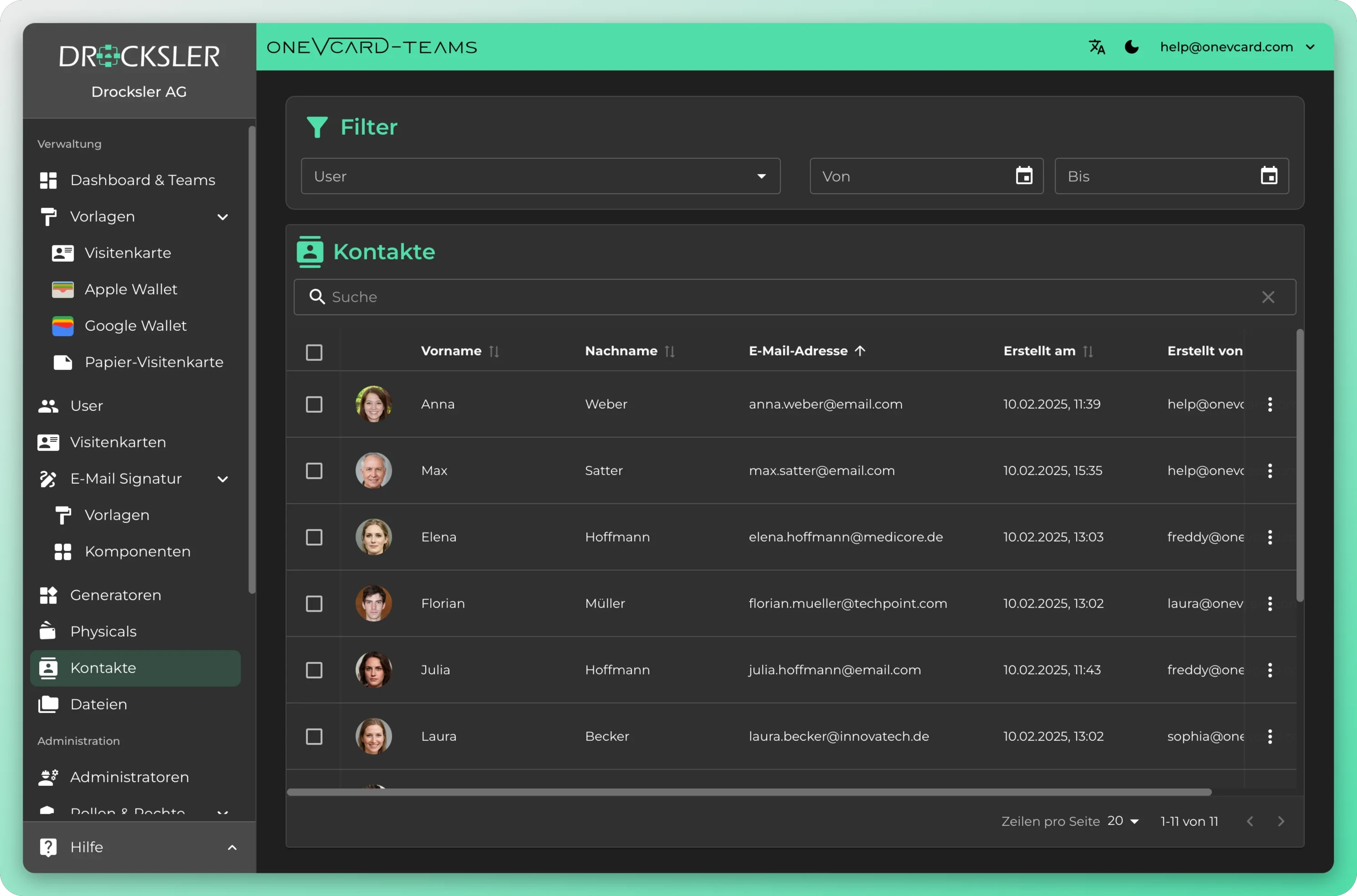
Lead management that thinks along
From a smartphone tap into the company CRM
- 1
Capture the lead
Your counterpart scans your oneVcard card at the booth and shares theirs back, or you scan their paper card with the business card scanner.
- 2
Set an automatic note
Enable the automatic note for the trade show period, and every new lead automatically gets the context, such as the event name, written into the note.
- 3
Review and filter centrally
All leads appear in the team contact book instantly. Filter by colleague and date and work through the list cleanly, without retyping a thing.
- 4
Hand off to the CRM
Export as CSV or VCF, or hand the leads off to your CRM and start the follow-up that same day.
Real-world use
Trade show and event teams
Hundreds of leads in three days, without a stack of business cards. The automatic note attaches the event name to every contact, and the date filter separates events cleanly.
Field sales
Capture a contact at the meeting via QR or NFC, with company and title landing straight in the contact book. With Contact you start a call or email right from the list.
Business development
A central view of all team leads. Filter by user to see who brings which contacts, and hand qualified leads off to the CRM in one batch.
Digital business card integrations
Optimise your business processes by integrating oneVcard with leading HR, ERP and CRM systems, or use our API and make.com integration for custom solutions. Available from the Teams Enterprise licence.
HR & identity
API & automation
CRM & office
- HR
- ERP
- CRM
- API
- make.com
What you should know about the team contact book
How do leads get into the team contact book? ▼
Via QR code scan, through lead generation, via NFC, through the business card scanner with AI analysis, manually via the plus menu or from vCard content. Every path lands in the same central contact book.
How can I tell that a contact is being synced automatically? ▼
Such contacts are specially marked. They are linked to a digital oneVcard business card and show its current data. If the person changes their card, the contact updates automatically. The core fields are then locked and always mirror the live status.
Can I still edit a synced contact? ▼
Yes. You remove the link to the business card with a single click. After that all fields are freely editable, but the contact no longer receives automatic updates.
How do I export the leads to the CRM? ▼
Select the contacts you want and export them as CSV or VCF. That lets you import them into HubSpot, Salesforce or your existing CRM. The export requires the appropriate permission.
Can I see who captured which contact? ▼
Yes. Every contact in the team contact book carries the columns Created on and Created by, meaning the date and the email of the colleague who added it. Use the filter to show only the leads of a single user.
Can leads be analyzed per trade show or time period? ▼
Yes. The date filter narrows the contact book to a creation period from to. Combined with the automatic note that attaches the event context to every new lead, you separate different events cleanly.
Top companies rely on digital business cards from oneVcard






Lead management for your team
We'll show you how your team captures leads faster, manages them centrally and hands them off to the CRM without retyping. Book a no-obligation call.